
Installing PyTorch on Fedora: the 2 GiB repo route versus a 209 MB pip CPU wheel
There are two ways to install PyTorch on Fedora, and the measured cost differs by an order of magnitude.
Route one: the Fedora repo (not recommended)
Section titled “Route one: the Fedora repo (not recommended)”dnf list --available python3-torchpython3-torch.x86_64 2.12.0-7.fc45 fedoraThat looks like 399 MiB of download and 755 MiB installed, but the real run says:
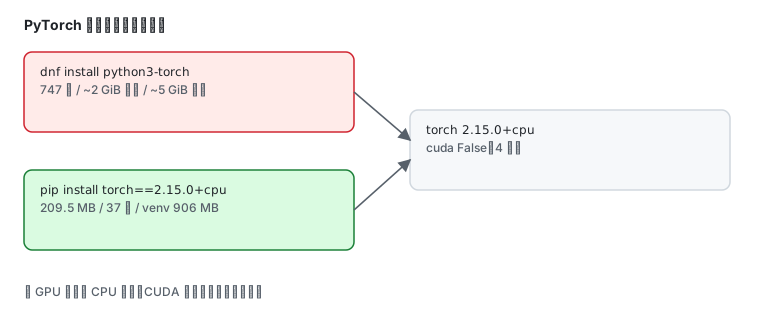
Total size of inbound packages is 2 GiB. Need to download 2 GiB.After this operation, 5 GiB extra will be used (install 5 GiB, remove 3 MiB).[ 1/747] cpuinfo-0:25.11.14-1.gitf858c 100% | 14.9 KiB/s | 44.7 KiB | 00m03s747 packages, 2 GiB of downloads, 5 GiB of disk. On this lab machine the download cache grew at roughly 43 KB/s, which puts the remainder at well over ten hours.
| Item | Value |
|---|---|
| total download | 2 GiB |
| dependency packages | 747 |
| disk usage | 5 GiB |
| measured rate here | ~43 KB/s |
Route two: the pip CPU wheel (recommended)
Section titled “Route two: the pip CPU wheel (recommended)”First check pip — Fedora does not install it by default:
python3 -m pip --version/usr/bin/python3: No module named pipInstall it, then create a virtual environment:
sudo dnf install python3-pippython3 -m venv ~/torch-venvThe measured python3-pip version is 26.1.2-5.fc45.
Now pull the CPU-only wheel:
~/torch-venv/bin/pip install --no-deps \ --index-url https://download.pytorch.org/whl/cpu \ "torch==2.15.0+cpu"Downloading torch-2.15.0%2Bcpu-cp315-cp315-manylinux_2_28_x86_64.whl (209.5 MB) ━━━━━━━━━━━━━━━━━━━━━━━━━━━━━━━━━━━━━━━━ 209.5/209.5 MB 5.9 MB/s 0:00:37209.5 MB at 5.9 MB/s, 37 seconds, versus 2 GiB at 43 KB/s — two orders of magnitude.
Filling in the dependencies
Section titled “Filling in the dependencies”import torch actually needs only a few small packages:
~/torch-venv/bin/pip install \ --index-url https://pypi.tuna.tsinghua.edu.cn/simple \ typing_extensions filelock jinja2 fsspecAfter that import torch works — sympy and networkx are not required.
NumPy is optional, but leaving it out produces a warning:
UserWarning: Failed to initialize NumPy: No module named 'numpy'If .numpy() should work, add it:
~/torch-venv/bin/pip install numpyVerifying the install
Section titled “Verifying the install”import torch, timeprint("version:", torch.__version__)print("cuda available:", torch.cuda.is_available())print("threads:", torch.get_num_threads())a = torch.randn(512, 512); b = torch.randn(512, 512)t0 = time.time(); c = a @ b; dt = (time.time() - t0) * 1000print("matmul 512x512: %.2f ms" % dt)print("shape:", tuple(c.shape))print("mean:", float(torch.tensor([1.0, 2.0, 3.0]).mean()))Measured output:
version: 2.15.0+cpucuda available: Falsethreads: 4matmul 512x512: 2.11 msshape: (512, 512)mean: 2.0Four things stand out:
- the version carries the
+cpusuffix — a CPU-only build cuda available: Falseis correct on a machine without a GPU, not a mistakethreads: 4is CPU parallelism, derived from the core count- a 512×512 matrix multiply takes 2.11 ms
With numpy present, tensor conversion works too:
~/torch-venv/bin/python -c "import torch;print(torch.tensor([1.0,2.0]).numpy())"[1. 2.]Disk cost
Section titled “Disk cost”du -sm ~/torch-venv906The whole venv is 906 MB (the 209.5 MB wheel expands to roughly 900 MB), far below the 5 GiB of the repo route.
Choosing between them
Section titled “Choosing between them”Fedora python3-torch | pip CPU wheel | |
|---|---|---|
| download | 2 GiB / 747 packages | 209.5 MB / 37 s |
| disk | 5 GiB | 906 MB (venv) |
| version | 2.12.0 | 2.15.0+cpu |
| isolation | installed into system Python | venv, delete the directory to uninstall |
| good for | system-wide management | almost everything |
Common traps
Section titled “Common traps”| Symptom | Cause |
|---|---|
No module named pip | Fedora does not ship pip; dnf install python3-pip |
dependencies hang on sympy | the primary index points at pytorch.org, where small packages crawl |
Failed to initialize NumPy warning | numpy absent; .numpy() unavailable |
cuda available: False | CPU wheel on a machine without a GPU — expected |
| disk dropped by 5 GiB | you took the dnf route |
| need the GPU build | switch to a CUDA index such as --index-url https://download.pytorch.org/whl/cu126 |
Related pages
Section titled “Related pages”- Install Python — interpreters and venv basics
- Ollama — another local-AI route
- Domestic mirrors — package repos and mirrors
- Official: PyTorch install page