
Chinese input on Fedora 45: four routes compared, measured, and how to choose
Chinese input is genuinely the roughest edge on Fedora. Not because configuration is hard, but because one requirement has four mutually incompatible technical routes, and online guides mix them freely — so you get halfway through and find the framework does not match.
Everything below is written measure-first, and every number comes from Fedora 45.
1. The default state
Section titled “1. The default state”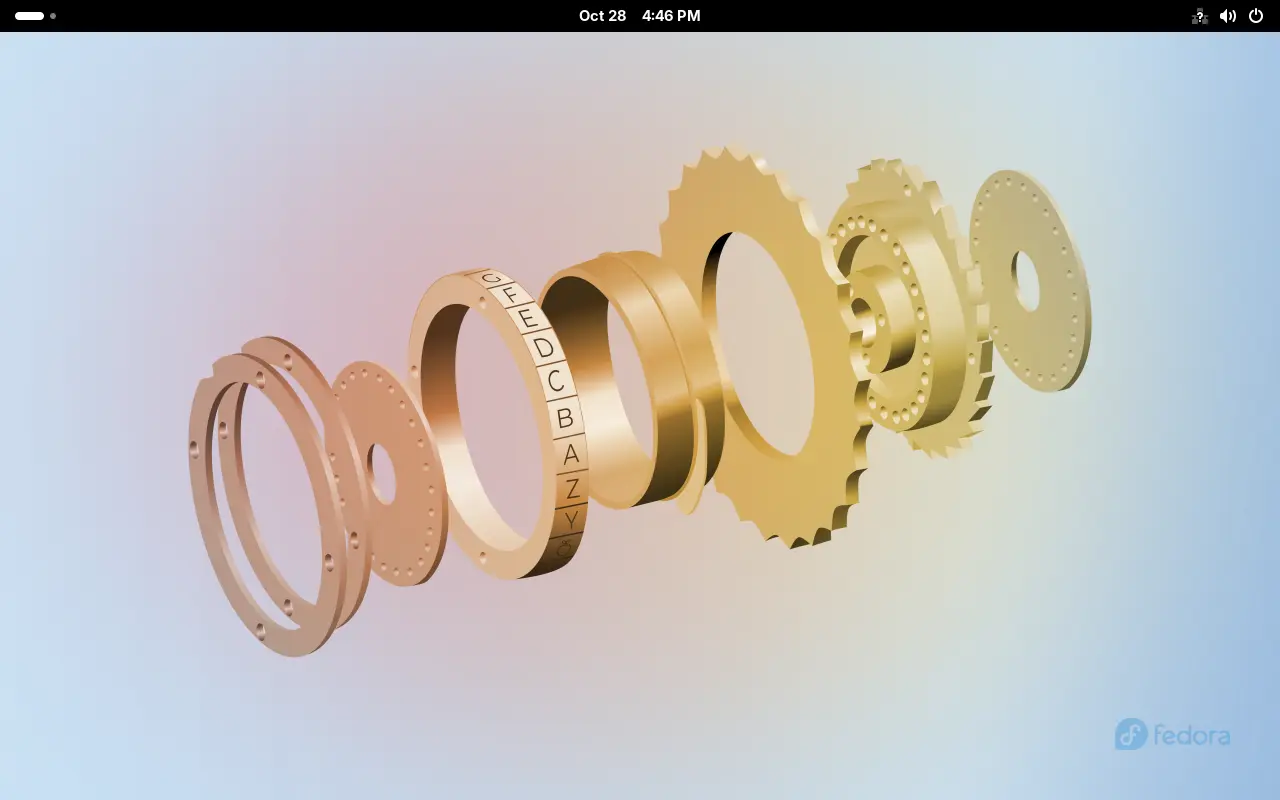
On the Workstation 45 image:
rpm -q ibus ibus-libpinyinibus-1.5.35~beta1-1.fc45.x86_64ibus-libpinyin-1.16.5-6.fc45.x86_64rpm -q fcitx5 fcitx5-chinese-addonspackage fcitx5 is not installedpackage fcitx5-chinese-addons is not installedThe default is IBus with libpinyin; fcitx5 is not installed at all.
And no Chinese input source is configured either:
dconf read /desktop/gnome/input-sources/sourcesThe output is empty. That is why the top bar shows no input method icon (as in the screenshot) — you must add a source first.
What is already running
Section titled “What is already running”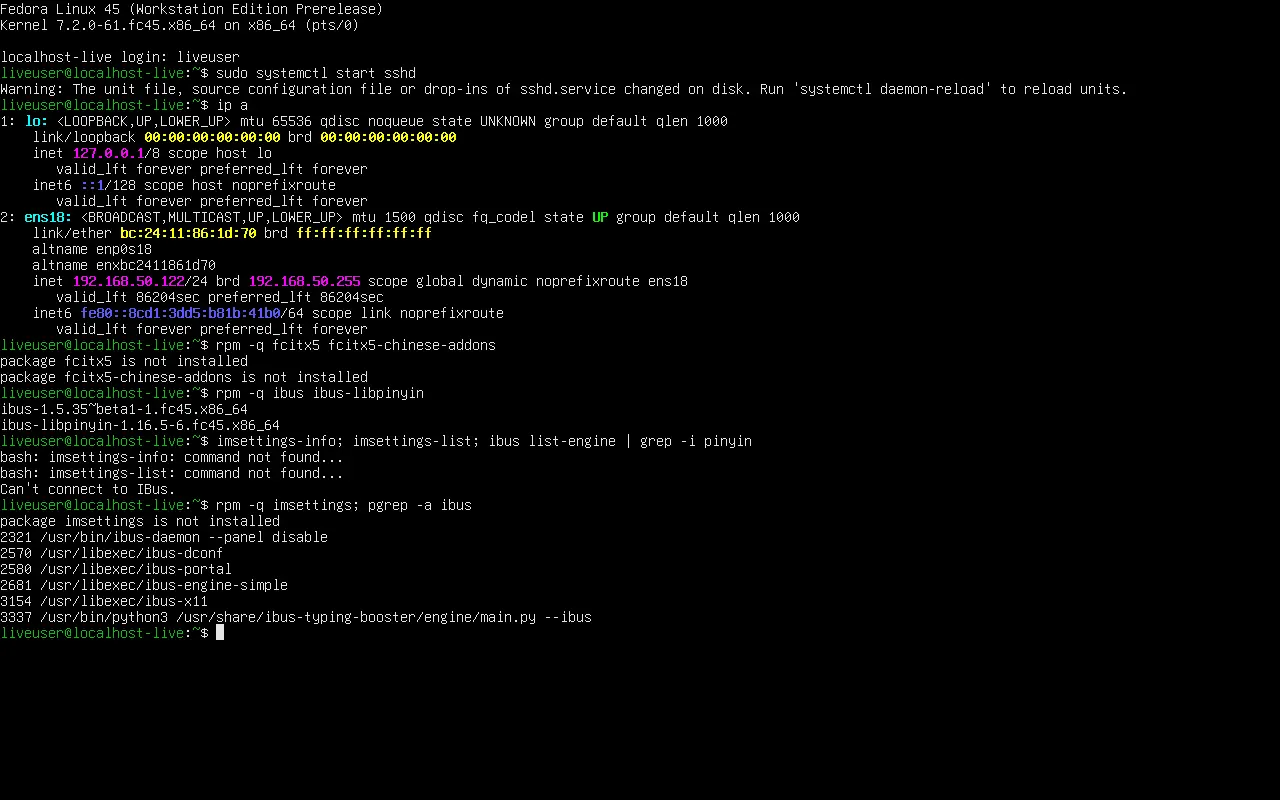
pgrep -a ibus2321 /usr/bin/ibus-daemon --panel disable2570 /usr/libexec/ibus-dconf2580 /usr/libexec/ibus-portal2581 /usr/libexec/ibus-engine-simple3154 /usr/libexec/ibus-x113037 /usr/bin/python3 /usr/share/ibus-typing-booster/engine/main.py --ibusThree things to note:
ibus-daemonis running;--panel disablemeans GNOME draws the panel itselfibus-typing-boosteris loaded by default and provides completionibus-engine-simpleis a placeholder engine — it does not mean Chinese is available
2. Four routes, measured
Section titled “2. Four routes, measured”Install transactions measured on a minimal system (dnf install --assumeno output):
| Route | Packages | Download | Disk | Changes framework |
|---|---|---|---|---|
| IBus + ibus-rime | 10 | 8 MiB | 23 MiB | no |
| IBus + ibus-libpinyin | 11 | 28 MiB | 193 MiB | no |
| fcitx5 + fcitx5-rime | 62 | 26 MiB | 118 MiB | yes |
| fcitx5 + fcitx5-chinese-addons | 88 | — | — | yes |
(fcitx5 + chinese-addons also upgrades 6 packages and replaces 6 — the longest transaction of the four.)
The table already answers most questions:
- Stay on IBus unless you must switch — switching means environment variables, GNOME integration and tray handling, a much larger failure surface
- ibus-rime is the lightest: 10 packages, 23 MiB, an order of magnitude smaller than the libpinyin route
- Both fcitx5 routes pull 60+ packages and require
imsettingsor environment variable changes
Measured: installing all four at once
Section titled “Measured: installing all four at once”To check whether the four engine sets can coexist, I installed every route on one Fedora 45 system:

rpm -q ibus-libpinyin ibus-rime fcitx5 fcitx5-chinese-addons fcitx5-rimeibus-libpinyin-1.16.5-6.fc45.x86_64ibus-rime-1.6.0-3.fc45.x86_64fcitx5-5.1.23-1.fc45.x86_64fcitx5-chinese-addons-5.1.15-1.fc45.x86_64fcitx5-rime-5.1.15-1.fc45.x86_64All four coexist without conflict: inside IBus, libpinyin and the rime engine sit side by side; inside fcitx5, the pinyin and rime engines do the same. The real either-or choice is which framework runs, not which packages you install.
On the fcitx5 side the bundled diagnostic confirms the engines are registered:
fcitx5-diagnose | grep -E "Pinyin|Rime"Cloud Pinyin 5.1.15Pinyin 5.1.15Extra Pinyin functionality 5.1.15Rime 5.1.15fcitx5-diagnose reports 30 enabled addons and 0 disabled, with all four Chinese engines among them.
3. Route A: IBus + Intelligent Pinyin (nothing to install)
Section titled “3. Route A: IBus + Intelligent Pinyin (nothing to install)”If ibus-libpinyin is present (the Workstation image includes it), nothing needs installing:
- Open Settings → Keyboard
- Under Input Sources click ”+”
- Choose Chinese (China) → Chinese (Intelligent Pinyin) → Add
- The top bar now shows the indicator;
Super + Spaceswitches
4. Route B: IBus + Rime (recommended for a better typing feel)
Section titled “4. Route B: IBus + Rime (recommended for a better typing feel)”Rime is the best-regarded open-source input engine, and it plugs into IBus directly without changing frameworks.
sudo dnf install ibus-rimeibus-rime.x86_64 1.6.0-3.fc45librime.x86_64 1.16.1-4.fc45Measured transaction: 10 packages, 8 MiB download, 23 MiB on disk.
Then:
ibus restartSettings → Keyboard → Input Sources now lists Chinese (Rime); add it.
On first login a notification appears: “ibus-rime — Rime is under maintenance …”. That is Rime deploying its dictionaries; wait for it to finish before typing.
What it actually looks like
Section titled “What it actually looks like”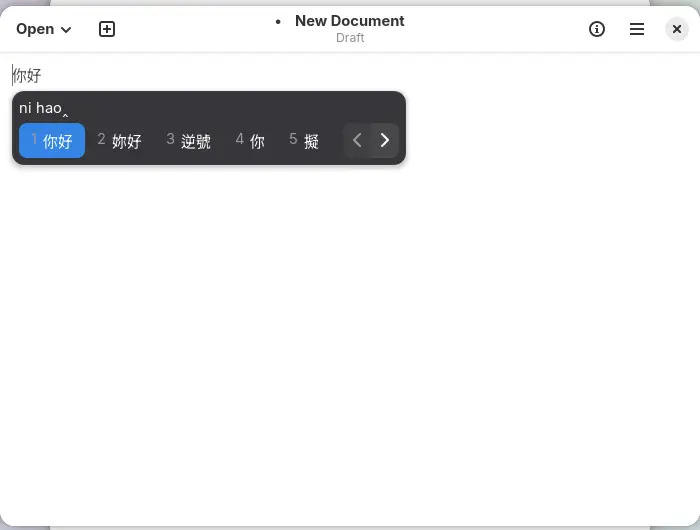
That is the real candidate window for typing nihao.
Note the traditional characters mixed in (妳好, 逆號, 擬) — Rime’s default schema, 朙月拼音, is traditional-first.
Switching to simplified
Section titled “Switching to simplified”Press F4 (or Ctrl + backtick) for the schema menu:
〔方案選單〕1 朙月拼音 2 中/半/漢/。 3 朙月拼音·簡化字 4 朙月拼音·語句流 5 注音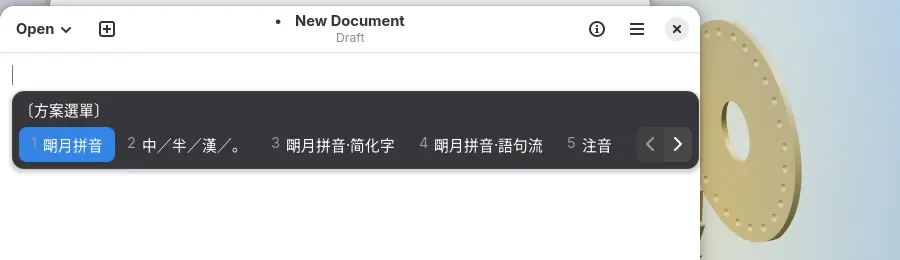
Press 3 for 朙月拼音·簡化字, then type wenti:
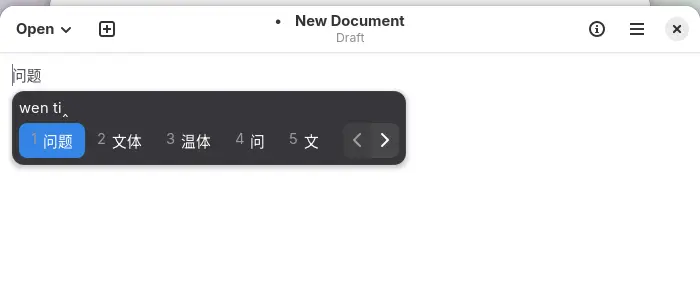
Every candidate is now simplified. The choice is remembered, so you do it once.
Rime’s default keys:
| Action | Key |
|---|---|
| Chinese/English | Shift |
| Scheme menu | Ctrl + backtick |
| Page candidates | , . or - = |
| Select | number keys, or space for the first |
5. Route C: fcitx5 (when you need more)
Section titled “5. Route C: fcitx5 (when you need more)”fcitx5 wins on plugin ecosystem and candidate window feel, at the cost of replacing the whole framework.
sudo dnf install fcitx5 fcitx5-chinese-addons fcitx5-configtool fcitx5-autostart fcitx5-gtkVersions in the F45 repository:
| Package | Version |
|---|---|
fcitx5 | 5.1.23 |
fcitx5-chinese-addons | 5.1.15 |
fcitx5-configtool | 5.1.16 |
fcitx5-autostart | 5.1.23 |
fcitx5-gtk | 5.1.7 |
fcitx5-rime | 5.1.15 |
fcitx5-gtk is mandatory — without it GTK applications cannot type Chinese, which is the most common “installed but useless” cause.
Switch the framework:
sudo dnf install imsettingsimsettings-switch fcitx5Then log out and back in — imsettings reads its configuration at session start.
fcitx5 + Rime
Section titled “fcitx5 + Rime”For the fcitx5 candidate window with the Rime engine, install fcitx5-rime (5.1.15) instead of chinese-addons:
sudo dnf install fcitx5 fcitx5-rime fcitx5-configtool fcitx5-autostart fcitx5-gtkMeasured: 62 packages, 26 MiB download, 118 MiB on disk — lighter than the chinese-addons route.
6. Third party: is Sogou worth it
Section titled “6. Third party: is Sogou worth it”Sogou does publish a Linux build and the download page is reachable (https://shurufa.sogou.com/linux returns 200), but there are real problems:
dnf list --available 'sogou*'Fedora repositories contain no Sogou package at all (empty output).
So the only path is downloading their RPM, and they target el8 / el9 (RHEL 8/9):
| Issue | Detail |
|---|---|
| Package target | .rpm built for RHEL, not Fedora 45 |
| Dependencies | you must resolve missing rpm -qpR entries by hand, and they fight system library versions |
| Updates | not covered by dnf upgrade; you track the vendor site yourself |
| Closed source | keystrokes pass through vendor dictionaries and cloud candidates; evaluate the privacy policy |
| Removal | installed libraries may be depended on by other packages, leaving a messy uninstall |
Sogou is not impossible, it is simply not packaged for Fedora, which makes it a “you own the maintenance” option. Prefer the four repository routes for daily use.
7. Wayland caveats
Section titled “7. Wayland caveats”Fedora 45 Workstation defaults to Wayland, where:
- Prefer
imsettings-switchover hand-written environment variables GTK_IM_MODULE,QT_IM_MODULEandXMODIFIERSmay not take effect, because GNOME has a native input protocol- Some apps (especially Electron/Chromium) need explicit flags: Chromium accepts
--gtk-version=4or--enable-wayland-ime, pick one only, and the latter depends on compositor support
Check the session:
echo "$XDG_SESSION_TYPE"8. Troubleshooting order
Section titled “8. Troubleshooting order”Work through this in order — it saves a lot of time:
| Step | Command | Look for |
|---|---|---|
| 1. framework alive | pgrep -a ibus or pgrep -a fcitx5 | a running process |
| 2. engine registered | ibus list-engine then grep pinyin | a Chinese engine |
| 3. source added | dconf read /desktop/gnome/input-sources/sources | empty means not added |
| 4. GTK module | rpm -q fcitx5-gtk (fcitx5 route) | missing means no Chinese in GTK apps |
| 5. session type | echo $XDG_SESSION_TYPE | wayland or x11 |
9. Which one to pick
Section titled “9. Which one to pick”| Your situation | Choose |
|---|---|
| fresh install, just needs to type | nothing — add Chinese (Intelligent Pinyin) in Settings |
| better Chinese feel without touching the framework | ibus-rime (10 packages, 23 MiB) |
| need fcitx5 candidates/plugins | fcitx5 + fcitx5-chinese-addons (88 packages) |
| want fcitx5 with the Rime engine | fcitx5 + fcitx5-rime (62 packages, 118 MiB) |
| must have Sogou | grab the vendor RPM, accept dependency conflicts and manual updates |
Common traps
Section titled “Common traps”| Symptom | Cause |
|---|---|
| no indicator in the top bar | no input source configured (dconf read is empty) |
| fcitx5 installed but no Chinese | fcitx5-gtk missing |
imsettings-switch: command not found | imsettings is not preinstalled |
| framework switch did nothing | no logout/login |
| chinese-addons downloaded hundreds of MB | the transaction is 88 packages, expected |
ibus list-engine cannot connect on a TTY | no desktop DBus; use a graphical terminal |
| env vars ignored on Wayland | switch via imsettings-switch instead |
| Rime dictionaries gone | different config paths per framework; redeploy |
Related pages
Section titled “Related pages”- Fedora 45 Workstation — desktop tour
- Install PHP — another “install then configure” case
- SELinux — how to reason about blocked desktop apps
- Official: Fedora input method docs
- Upstream: Fcitx 5 on Wayland