
Tuning Fedora 45: zram and oomd are already on, tuned is not
Before tuning anything, establish what is already done — otherwise you duplicate work or break a good default.
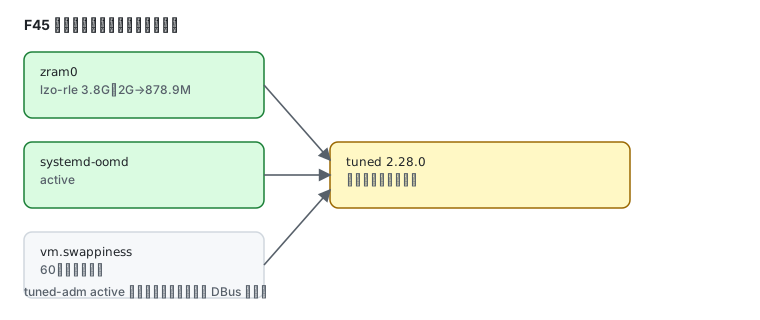
Measured defaults
Section titled “Measured defaults”cat /proc/sys/vm/swappinesszramctlsystemctl is-active systemd-oomdsystemctl is-active tuned60NAME ALGORITHM DISKSIZE DATA COMPR TOTAL STREAMS MOUNTPOINT/dev/zram0 lzo-rle 3.8G 2G 878.9M 896.9M [SWAP]activeinactiveFour things are already in place:
| Item | F45 default | What it does |
|---|---|---|
| zram | enabled, lzo-rle, 3.8G | compressed RAM used as swap, far faster than disk swap |
| systemd-oomd | active | kills processes under memory pressure instead of letting the machine thrash |
| swappiness | 60 | kernel default |
| tuned | not running | you install and enable it yourself |
tuned: install it or not
Section titled “tuned: install it or not”tuned is Fedora’s automatic tuning daemon; the repository carries 2.28.0 and the measured transaction is 13 packages.
sudo dnf install tunedsudo systemctl enable --now tunedtuned-adm activeCurrent active profile: virtual-guestIt detects the machine type. On a virtual machine the default profile after enabling is virtual-guest, with no manual selection.
List every profile:
tuned-adm listMeasured: 15 profiles. The ones that matter:
| Profile | Use |
|---|---|
balanced | general purpose, the default |
desktop | interactive desktop work |
throughput-performance | throughput first, power saving off |
latency-performance | latency first |
virtual-guest | virtual machine guest (auto-selected here) |
powersave | power saving |
Switch:
sudo tuned-adm profile throughput-performancezram: already on, do not configure it twice
Section titled “zram: already on, do not configure it twice”F45 creates the zram device through zram-generator, configured in /usr/lib/systemd/zram-generator.conf. It is enabled by default, so no manual setup is needed.
rpm -q zram-generatorzram-generator-1.2.1-6.fc45.x86_64Only edit the configuration to change the size, then:
sudo systemctl daemon-reloadOOM protection: systemd-oomd is running
Section titled “OOM protection: systemd-oomd is running”systemctl is-active systemd-oomdsystemctl status systemd-oomd --no-pager | head -5It kills by cgroup memory pressure, intervening earlier and more selectively than the kernel OOM killer.
An alternative is earlyoom (1.9.0), blunter but predictable:
sudo dnf install earlyoomsudo systemctl enable --now earlyoomPick one. Running both means they race to kill your processes.
Observation tools
Section titled “Observation tools”| Tool | Version | Purpose |
|---|---|---|
htop | 3.5.3 | live process and memory view |
btop | 1.4.7 | prettier TUI including network and disks |
powertop | 2.15 | power draw and wakeup analysis |
sudo dnf install btop htop powertopbtoppowertop needs root for complete data:
sudo powertopA sensible order of operations
Section titled “A sensible order of operations”- Look at the defaults:
zramctl,systemctl is-active systemd-oomd— for most machines this is already enough - Then decide on tuned: servers and VMs benefit; let it pick the profile
- Only then touch kernel parameters:
vm.swappinessand friends, having noted the original value
Persist a kernel parameter properly:
echo 'vm.swappiness = 10' | sudo tee /etc/sysctl.d/99-swappiness.confsudo sysctl --systemsysctl -w alone is temporary and disappears on reboot.
Common traps
Section titled “Common traps”| Symptom | Cause |
|---|---|
tuned-adm cannot reach DBus | the daemon is not started |
| swappiness change lost after reboot | only sysctl -w was used |
| zram size change had no effect | systemd-zram-setup@zram0 was not restarted |
| the machine still stalls | oomd and earlyoom both running, or neither covers the actual bottleneck |
| no performance change after tuned | the profile is balanced, which barely differs from default |
Related pages
Section titled “Related pages”- systemd services and timers — unit management and
daemon-reload - Storage and btrfs — swap and filesystem level
- Terminals and shells — where the observation tools run