
Backup and restore on Fedora: btrfs snapshots, tar and SELinux labels
The usual backup mistake is not “no backup” but a backup that will not restore. On Fedora there is an extra layer — SELinux labels — and a plain tar -cf throws them away.
Everything below was measured on F45.
First, decide what you are backing up
Section titled “First, decide what you are backing up”| Layer | Contents | Method |
|---|---|---|
| System state | which packages, repository config | rpm -qa list plus config files |
| Files and data | /etc, /home, /var/lib | btrfs snapshot / tar / rsync |
| Whole-machine rollback | the entire root filesystem | btrfs snapshot |
None replaces the others: a package list does not restore data, and a snapshot rollback is too blunt to fix “one wrong package”.
btrfs snapshots: placement matters more than the command
Section titled “btrfs snapshots: placement matters more than the command”F45 defaults to btrfs (see storage), where snapshots are free — they only record copy-on-write references.
Look at the current layout:
findmnt -no FSTYPE /sudo btrfs subvolume list /btrfs
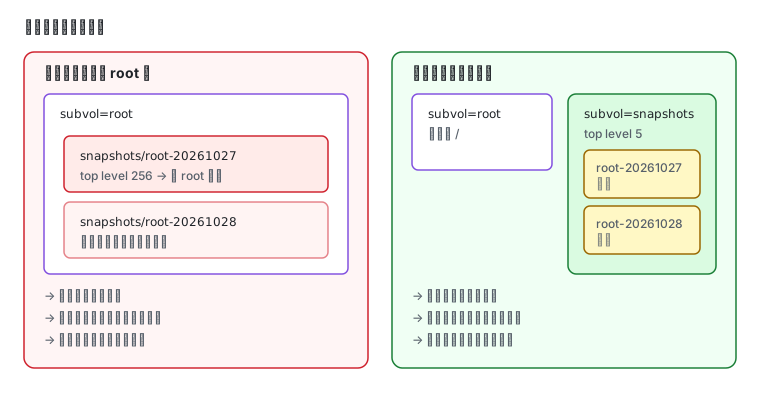
ID 256 gen 364 top level 5 path rootID 257 gen 300 top level 5 path bootID 258 gen 368 top level 5 path homeID 259 gen 368 top level 5 path varThe trap: a snapshot nested inside its own subvolume
Section titled “The trap: a snapshot nested inside its own subvolume”Doing this directly:
sudo mkdir -p /snapshotssudo btrfs subvolume snapshot -r / /snapshots/root-$(date +%Y%m%d)puts the snapshot inside the root subvolume:
ID 260 gen 369 top level 256 path root/snapshots/root-20261027top level 256 is the root subvolume. The next root snapshot therefore includes the previous one, and snapshot size snowballs.
The correct way: a separate top-level subvolume
Section titled “The correct way: a separate top-level subvolume”sudo mkdir -p /mnt/topsudo mount -o subvolid=5 /dev/sda3 /mnt/top # mount the top levelsudo btrfs subvolume create /mnt/top/snapshotssudo umount /mnt/topNow snapshots land in snapshots, a sibling of root:
sudo btrfs subvolume snapshot -r / /mnt/top/snapshots/root-$(date +%Y%m%d-%H%M)sudo btrfs subvolume list /mnt/top | grep snapshotsID 261 gen 371 top level 5 path snapshotsID 262 gen 371 top level 261 path snapshots/root-20261027-1747top level 261 is the snapshots subvolume — no recursion.
How much space they use:
sudo btrfs filesystem usage /Overall: Device size: 19.90GiB Device allocated: 5.02GiB Device unallocated: 14.88GiBA snapshot adds nothing to allocated until the original blocks are modified and diverge. A fresh snapshot costs almost nothing.
tar: without the right flags it drops SELinux labels
Section titled “tar: without the right flags it drops SELinux labels”This is where Fedora backups break. One file, three states:
# create a file with a specific labelsudo mkdir -p /tmp/seltest/srcecho hi | sudo tee /tmp/seltest/src/file >/dev/nullsudo chcon -t httpd_sys_content_t /tmp/seltest/src/file
# archive it twice: plain, and with --selinux --xattrssudo tar -cf /tmp/seltest/no-selinux.tar -C /tmp/seltest/src .sudo tar --selinux --xattrs -cf /tmp/seltest/with-selinux.tar -C /tmp/seltest/src .
# extract both and compare labelssudo mkdir -p /tmp/seltest/a /tmp/seltest/bsudo tar -xf /tmp/seltest/no-selinux.tar -C /tmp/seltest/asudo tar --selinux --xattrs -xf /tmp/seltest/with-selinux.tar -C /tmp/seltest/bsudo ls -Z /tmp/seltest/src/file /tmp/seltest/a/file /tmp/seltest/b/file
original : unconfined_u:object_r:httpd_sys_content_t:s0no-flag : unconfined_u:object_r:user_tmp_t:s0with-flag: unconfined_u:object_r:httpd_sys_content_t:s0The middle line is the disaster: the label fell from httpd_sys_content_t to user_tmp_t, inherited from the destination directory. The content is intact; the service can no longer read it.
The correct pair of commands:
sudo tar --selinux --xattrs --acls -czf backup-etc.tar.gz -C / etcsudo tar --selinux --xattrs --acls -xzpf backup-etc.tar.gz -C /mnt/restore-p preserves permission bits. --selinux and --xattrs are both required — the first carries SELinux contexts, the second carries extended attributes (including capabilities).
Package list: the only record of system state
Section titled “Package list: the only record of system state”rpm -qa | wc -lrpm -qa --qf '%{NAME}\n' | sort > /var/backups/pkgs.txt631An F45 base system is 631 packages. To restore:
sudo dnf install $(cat /var/backups/pkgs.txt)You also want the repository configuration and recent transactions:
cp /etc/yum.repos.d/*.repo /var/backups/ 2>/dev/nullls /usr/share/dnf5/repos.d/ > /var/backups/repos-list.txt # F45 packaged repossudo dnf history list | head -5ID Command line Date and time Action(s) Altered10 dnf -y install dbus-daemon 2026-10-26 18:21:45 1 9 dnf -y install dbus-tools 2026-10-26 18:20:19 1Two things to do after restoring
Section titled “Two things to do after restoring”One, restore SELinux labels (if they were not preserved, or the files went to a different path):
sudo restorecon -Rv /etc /var/www /homeTwo, confirm services come back:
sudo systemctl daemon-reloadsystemctl list-units --failedVerify the backup — the most important step
Section titled “Verify the backup — the most important step”An unverified backup is not a backup. The minimum set:
# 1) can the archive be readtar -tzf backup-etc.tar.gz | wc -l
# 2) can it be extracted somewhere temporarymkdir -p /tmp/verify && tar -xzpf backup-etc.tar.gz -C /tmp/verify
# 3) are the key files there and correctdiff -q /tmp/verify/etc/hostname /etc/hostname
# 4) are the labels intactls -Z /tmp/verify/etc/ssh/sshd_config
Verifying a btrfs snapshot is even more direct — mount it and look:
sudo mount -o ro,subvol=/snapshots/root-20261028-0300 /dev/sda3 /mnt/checkls /mnt/check/etc | headsudo umount /mnt/checkScheduling backups
Section titled “Scheduling backups”Use a systemd timer rather than cron (F45 minimal images ship no crontab); the pattern is in systemd services and timers:
[Unit]Description=Nightly etc backup
[Timer]OnCalendar=*-*-* 03:30:00Persistent=true
[Install]WantedBy=timers.target
Put the tar --selinux --xattrs --acls ... line in the matching .service. Persistent=true makes a missed run catch up after boot.
Related pages
Section titled “Related pages”- Storage and filesystems — btrfs subvolumes, mounts and capacity
- SELinux — why labels matter and how to restore them
- systemd services and timers — writing the scheduled backup
- Upgrading to Fedora 45 — what to back up before upgrading
- Official: Btrfs