
Podman on Fedora: install, daily commands, registry mirrors and Quadlet autostart
Fedora ships Podman as its container engine; Docker is not needed. Measured on a Cloud image:
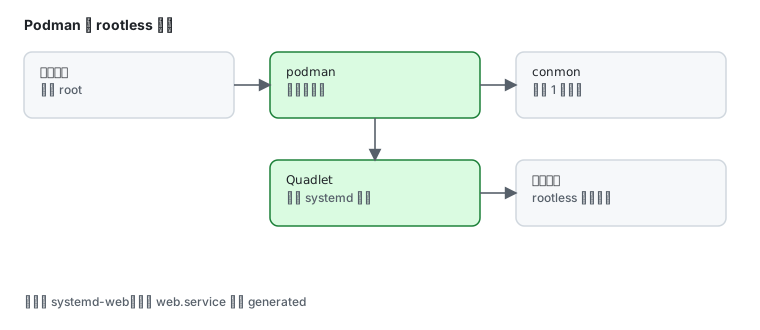
podman --versionpodman info --format '{{.Host.Security.Rootless}}'podman version 6.1.0truetrue means rootless containers work — ordinary users can run containers without sudo.
If it is not installed
Section titled “If it is not installed”sudo dnf install podmanFor scripts that hardcode docker:
sudo dnf install podman-dockerAfter that docker is a shim over podman and docker ps works.
Daily commands
Section titled “Daily commands”Run a container:
podman run --rm docker.io/library/alpine echo "hello from podman"hello from podman--rm removes it on exit.
Inspect:
podman images --format "{{.Repository}}:{{.Tag}} {{.Size}}"podman ps -adocker.io/library/alpine:latest 8.72 MBdocker to podman map
Section titled “docker to podman map”| Task | docker | podman |
|---|---|---|
| run | docker run | podman run |
| running list | docker ps | podman ps |
| all list | docker ps -a | podman ps -a |
| exec | docker exec -it | podman exec -it |
| logs | docker logs | podman logs |
| build | docker build | podman build (or buildah) |
| compose | docker compose | podman compose / Quadlet |
| daemon | dockerd | none |
That last row matters: Podman calls runc/crun directly and runs no daemon, so there is no systemctl status docker.
Domestic registry mirror
Section titled “Domestic registry mirror”Docker Hub pulls frequently time out here. Add a registry rewrite:
sudo tee /etc/containers/registries.conf.d/99-cn.conf >/dev/null <<'EOF'unqualified-search-registries = ["docker.io"]
[[registry]]prefix = "docker.io"location = "docker.m.daocloud.io"EOF
Then podman pull nginx goes through the mirror. Measured:
time podman pull -q docker.io/library/alpinereal 0m9.692sVolumes and ports
Section titled “Volumes and ports”podman run -d --name web \ -p 8080:80 \ -v /srv/html:/usr/share/nginx/html:Z \ docker.io/library/nginxThe trailing :Z is the SELinux label and is mandatory on Fedora — without it the container cannot read the host directory and reports Permission denied (see SELinux).
Verify:
curl -s http://127.0.0.1:8080/ | head -3podman logs web --tail 3podman exec -it web shQuadlet: containers that start at boot
Section titled “Quadlet: containers that start at boot”This is the most useful part. The old podman generate systemd is gone in 6.x — Quadlet replaces it: write a declarative file and systemd generates the unit.
Check the directory and generator:
ls -d /etc/containers/systemdls /usr/lib/systemd/system-generators/ | grep podman/etc/containers/systemdpodman-system-generatorWrite a container:
sudo tee /etc/containers/systemd/web.container >/dev/null <<'EOF'[Unit]Description=Demo web container
[Container]Image=docker.io/library/alpine:latestExec=sleep infinity
[Install]WantedBy=default.targetEOF
Reload and look at the generated unit:
sudo systemctl daemon-reloadsystemctl status web.service --no-pager | head -5○ web.service - Demo web container Loaded: loaded (/etc/containers/systemd/web.container; generated) Active: inactive (dead)Note generated: this .service is produced from the .container file. Do not edit it by hand.
Start it:
sudo systemctl start web.servicesystemctl is-active web.servicepodman ps --format "{{.Names}} {{.Status}}"activesystemd-web Up 2 secondsThe container is named systemd-web (with the systemd- prefix).
User-level Quadlet (rootless, recommended)
Section titled “User-level Quadlet (rootless, recommended)”mkdir -p ~/.config/containers/systemdcp /etc/containers/systemd/web.container ~/.config/containers/systemd/systemctl --user daemon-reloadsystemctl --user start web.serviceFor user services that must run without an active login:
sudo loginctl enable-linger $USERMigrating from Docker
Section titled “Migrating from Docker”| Docker habit | On Podman |
|---|---|
docker compose up | dnf install podman-compose, then podman-compose up, or convert to Quadlet |
systemctl restart docker | no daemon; restart the container or its unit |
/var/run/docker.sock | podman-docker provides a compatible socket; some tools still need config changes |
docker build | podman build — same Dockerfile syntax |
sudo systemctl restart docker # Unit docker.service not foundThat error is expected — there is no daemon to restart.
Common traps
Section titled “Common traps”| Symptom | Cause |
|---|---|
podman pull times out | no registry mirror configured, or the mirror lacks the image |
mounted directory Permission denied | missing :Z; SELinux blocked it |
| container has no outbound network | rootless needs --network=host or a working pasta/slirp4netns |
| Quadlet change has no effect | forgot systemctl daemon-reload after editing the .container |
| user service stops on logout | missing loginctl enable-linger |
systemctl restart docker fails | Podman has no daemon — expected |
Related pages
Section titled “Related pages”- Containers and rootless — uid mapping and security boundaries
- Podman 6 — what changed in 6.x
- Domestic mirrors — registry mirrors and other ecosystems
- SELinux — why mounts need
:Z - Official: Podman documentation