
Installing PostgreSQL on Fedora: choosing between 16, 17, 18 and 19beta
Fedora packages PostgreSQL in an unusual way: four major versions sit in the repo at once, but you can install only one.
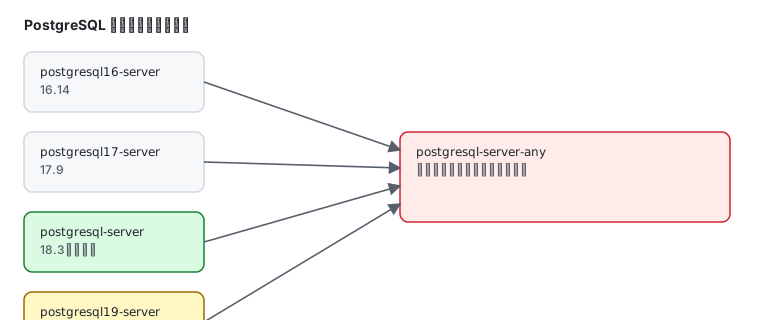
What the repo actually offers
Section titled “What the repo actually offers”dnf list --available "postgresql1*-server.x86_64" 2>/dev/null | grep x86_64postgresql16-server.x86_64 16.14-5.fc45 fedorapostgresql17-server.x86_64 17.9-10.fc45 fedorapostgresql19-server.x86_64 19beta1-6.fc45 fedoraPlus the unversioned name, which tracks the newest stable:
dnf list --available postgresql-server.x86_64postgresql-server.x86_64 18.3-12.fc45 fedora| You want | Install | Version |
|---|---|---|
| PG 16 | postgresql16-server | 16.14 |
| PG 17 | postgresql17-server | 17.9 |
| PG 18 (default) | postgresql-server | 18.3 |
| PG 19 (beta) | postgresql19-server | 19beta1 |
Installing the default (PG 18)
Section titled “Installing the default (PG 18)”sudo dnf install postgresql-serverModest size: 7.9 MiB download, 32.9 MiB installed.
Confirm the binaries:
postgres --versionpsql --versionpostgres (PostgreSQL) 18.3psql (PostgreSQL) 18.3initdb first — the package does not do it
Section titled “initdb first — the package does not do it”Fedora’s package does not initialize the data directory, so starting the service immediately fails. Initialize:
sudo postgresql-setup --initdb * Initializing database in '/var/lib/pgsql/data' * Initialized, logs are in /var/lib/pgsql/initdb_postgresql.logThe data directory is /var/lib/pgsql/data.
Then start:
sudo systemctl enable --now postgresqlsystemctl is-active postgresqlactiveTwo units are present:
postgresql.service disabled disabled[email protected] disabled disabled[email protected] is a template unit for running multiple instances on one host — the supported route for multi-instance needs (see below).
Verify a connection
Section titled “Verify a connection”sudo -u postgres psql -c "select version();" PostgreSQL 18.3 on x86_64-redhat-linux-gnu, compiled by gcc (GCC) 16.2.1 20260819 (Red Hat 16.2.1-2), 64-bit(1 row)Note the -u postgres: only the postgres system user can connect by default, because auth is peer-based.
Loopback only by default
Section titled “Loopback only by default”ss -lntp | grep 5432LISTEN 0 200 127.0.0.1:5432 0.0.0.0:*LISTEN 0 200 [::1]:5432 [::]:*As with Valkey, the database is not exposed by default.
Default auth: peer and ident
Section titled “Default auth: peer and ident”sudo grep -vE "^(#|$)" /var/lib/pgsql/data/pg_hba.conflocal all all peerhost all all 127.0.0.1/32 identhost all all ::1/128 identlocal replication all peerpeer— on a local socket, the OS username must match the database usernameident— TCP connections also require an identity check
So psql -U postgres fails as a normal user; use sudo -u postgres. To allow password login, switch the method to scram-sha-256 and set a password.
Running multiple versions
Section titled “Running multiple versions”Since the four repo packages are mutually exclusive, keeping 16 and 18 on one host takes one of three routes:
| Approach | How | Trade-off |
|---|---|---|
| multi-instance (recommended) | several instances of one version via [email protected], different ports and data dirs | same version only |
| PGDG repository | add PostgreSQL’s pgdg repo and install postgresql-16-server plus postgresql-18-server | extra repo |
| containers | one Podman container per version | strongest isolation, more ops work |
The key to multi-instance is the template unit. The instance name maps to a data directory:
sudo postgresql-setup --initdb --unit postgresql@16-main \ --port 5433 --datadir /var/lib/pgsql/16/datasudo systemctl enable --now postgresql@16-mainNow 18 listens on 5432 and 16 on 5433, independent of each other.
Everyday commands
Section titled “Everyday commands”sudo -u postgres psql # interactive psqlsudo -u postgres createuser --interactivesudo -u postgres createdb mydbsudo -u postgres psql -c "\l" # list databasessudo -u postgres psql -c "\du" # list roles\q exits.
Common traps
Section titled “Common traps”| Symptom | Cause |
|---|---|
| service will not start | postgresql-setup --initdb was never run |
psql: FATAL: Peer authentication failed | a normal user ran psql -U postgres; use sudo -u postgres |
pg_hba.conf edit has no effect | forgot systemctl reload postgresql |
| remote 5432 fails | default bind is 127.0.0.1; change listen_addresses |
| installing 16 and 18 together errors | they conflict; use multi-instance or PGDG |
| wrong data directory ownership | must be postgres:postgres; restart after fixing |
Related pages
Section titled “Related pages”- Valkey — default configuration of another database
- Podman in practice — multiple versions via containers
- Multiple versions — the version policy across languages
- firewalld — preparing to open 5432
- Official: PostgreSQL documentation