
Installing MySQL on Fedora: 9.7 or 8.4, and why it listens on every interface
Fedora offers two MySQL versions but only one at a time, and its default behaviour differs from the two databases covered earlier.
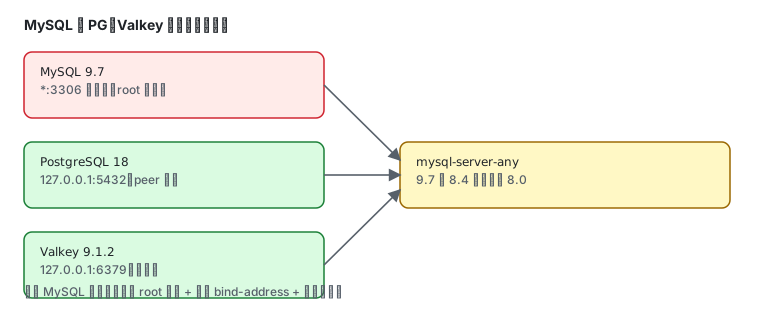
Two versions, and no 8.0
Section titled “Two versions, and no 8.0”dnf list --available "mysql*server*.x86_64" 2>/dev/null | grep -E "server"mysql-server.x86_64 9.7.2-1.fc45 fedoramysql8.4-server.x86_64 8.4.11-1.fc45 fedora| You want | Install | Version | Download / installed |
|---|---|---|---|
| MySQL 9.x (default) | mysql-server | 9.7.2 | 21.7 MiB / 125.5 MiB |
| MySQL 8.4 LTS | mysql8.4-server | 8.4.11 | 19.3 MiB / 114.4 MiB |
There is no 8.0. For 8.0 you need MySQL’s own repository or a container.
Installing 9.7
Section titled “Installing 9.7”sudo dnf install mysql-servermysqld --version/usr/libexec/mysqld Ver 9.7.2 for Linux on x86_64 (Source distribution)Note the path: /usr/libexec/mysqld, not /usr/sbin/mysqld — the mysqld on your PATH is a wrapper.
No initdb — just start it
Section titled “No initdb — just start it”This is the opposite of PostgreSQL. PostgreSQL requires postgresql-setup --initdb; MySQL initializes its data directory on first start:
sudo systemctl enable --now mysqldsystemctl is-active mysqldactiveTwo units exist:
systemctl list-unit-files | grep mysqldmysqld.service disabled disabled[email protected] disabled disabled[email protected] is the multi-instance template.
Verify — and there is no password
Section titled “Verify — and there is no password”sudo mysql -u root -e "select version();"version()9.7.2Inspect the accounts:
sudo mysql -u root -e "select user,host,plugin from mysql.user;"mysql.infoschema localhost caching_sha2_passwordmysql.session localhost caching_sha2_passwordmysql.sys localhost caching_sha2_passwordroot localhost caching_sha2_passwordAll local accounts, using caching_sha2_password (the MySQL 8 default, stronger than the old mysql_native_password).
The difference that matters: 3306 on every interface
Section titled “The difference that matters: 3306 on every interface”This is the biggest default-vs-default difference from PostgreSQL and Valkey:
ss -lntp | grep 3306LISTEN 0 4096 *:3306 *:*LISTEN 0 70 *:33060 *:**:3306 is all interfaces, not loopback. Port 33060 is the X Protocol (another protocol since MySQL 8).
Compare the three:
| Service | Default bind | Default auth |
|---|---|---|
| PostgreSQL 18 | 127.0.0.1:5432 | peer / ident, only the postgres user |
| Valkey 9.1 | 127.0.0.1:6379 | no password, but loopback only |
| MySQL 9.7 | *:3306 | passwordless root, reachable from the network |
This lab box has a second layer — the firewall only opens:
sudo firewall-cmd --list-servicesdhcpv6-client mdns ssh3306 is not there, so nothing reaches it from outside. But do not rely on that: the moment someone runs firewall-cmd --add-port=3306/tcp “for convenience”, the service is exposed.
Where the socket lives
Section titled “Where the socket lives”ss -lx | grep mysql/var/lib/mysql/mysql.sock/var/lib/mysql/mysqlx.sockThe location changed. Old scripts hardcoding /var/run/mysqld/mysqld.sock will not connect — it is now under the data directory.
Running multiple versions
Section titled “Running multiple versions”| Approach | How | Note |
|---|---|---|
| multi-instance | [email protected] with distinct datadir / port / socket | same version, several instances |
| vendor repository | MySQL’s own yum repo ships 8.0 / 8.4 / 9.x | can coexist, switch manually |
| containers | podman run -d -p 3307:3306 docker.io/library/mysql:8.0 | easiest, version on demand |
Containers are the most direct route for multiple versions:
podman run -d --name mysql80 -p 3307:3306 \ -e MYSQL_ROOT_PASSWORD=secret \ docker.io/library/mysql:8.0Now 9.7 sits on 3306 locally and 8.0 on 3307. See Podman in practice.
Everyday commands
Section titled “Everyday commands”sudo mysql -u root # interactive shellsudo mysql -u root -e "show databases;"sudo mysql -u root -e "create database app;"mysqladmin -u root status # runtime statussudo systemctl restart mysqldCommon traps
Section titled “Common traps”| Symptom | Cause |
|---|---|
| cannot connect after install | service not started; systemctl start mysqld |
Access denied for user 'root' | a password was set; add -p |
| remote 3306 unreachable | firewall does not allow it (the service itself listens everywhere) |
| old script fails on the socket path | socket is /var/lib/mysql/mysql.sock, not /run/mysqld/ |
| installing 8.4 alongside errors | they conflict; use a container or the vendor repo |
| mojibake with non-ASCII data | check client charset; MySQL 8 defaults to utf8mb4 |
Related pages
Section titled “Related pages”- PostgreSQL — 16/17/18/19 trade-offs and peer auth
- Valkey — Fedora no longer ships redis
- Podman in practice — databases as containers
- firewalld — whether to open 3306
- Official: MySQL documentation