
Containerfile and multi-stage builds with Podman on Fedora
No Docker is needed to build images on Fedora: podman build reads a Containerfile (Dockerfile syntax is fully compatible).
podman --versiondnf list --available buildah | tail -1podman version 6.1.0buildah.x86_64 2:1.45.1-1.fc45 fedora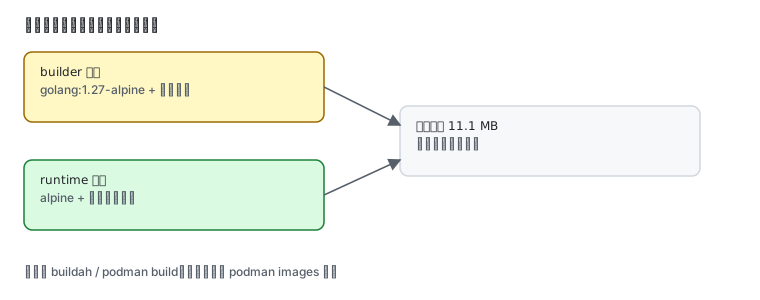
Containerfile or Dockerfile
Section titled “Containerfile or Dockerfile”Both names work and the syntax is identical. Podman looks for Containerfile first, then Dockerfile.
podman build -t myapp:1 .podman build -f Containerfile -t myapp:1 .Convention: Containerfile for Podman/Buildah, Dockerfile for Docker. Mixing them breaks nothing.
Multi-stage builds: why they matter
Section titled “Multi-stage builds: why they matter”Compiled languages (Go/Rust/Java) need large build dependencies that the runtime does not. Multi-stage builds separate the build environment from the runtime so only the binary ships.
Measured with a small Go program:
mkdir -p /tmp/cf && cd /tmp/cfcat > Containerfile <<'EOF'FROM docker.io/library/golang:1.27-alpine AS buildWORKDIR /srcRUN echo 'package main' > main.go && echo 'import "fmt"' >> main.go && echo 'func main(){ fmt.Println("built in stage 1") }' >> main.goRUN go build -o /out/hello main.go
FROM docker.io/library/alpine:latestCOPY --from=build /out/hello /usr/local/bin/helloCMD ["hello"]EOFpodman build -t demo:1 .podman images --format "{{.Repository}}:{{.Tag}} {{.Size}}" | grep demopodman run --rm demo:1localhost/demo:1 11.1 MBbuilt in stage 1The final image is 11.1 MB. A single-stage build would carry the whole Go toolchain — hundreds of megabytes.
| Approach | Final size | Note |
|---|---|---|
| single stage (golang base) | hundreds of MB | compiler and sources stay in the image |
| multi-stage (measured) | 11.1 MB | only the binary and the alpine base |
COPY --from=build is the key: it pulls files from the previous stage, which itself never enters the final image.
Layers and caching
Section titled “Layers and caching”Every RUN/COPY is a layer, and layer order decides cache hits:
# bad: a one-line code change reinstalls every dependencyCOPY . /appRUN npm install
# good: install dependencies first, copy code lastCOPY package.json package-lock.json /app/RUN npm installCOPY . /app
The effect is visible:
podman build -t demo:1 . # first build: everythingpodman build -t demo:2 . # second build: every layer cachedSTEP 1/3: FROM ...--> Using cache--> Using cache marks a hit. After a code change only the layers after COPY . /app rebuild.
Where buildah fits
Section titled “Where buildah fits”| Tool | Good for |
|---|---|
podman build | everyday builds |
buildah | scripting, fine-grained work without a daemon, stepwise CI builds |
podman buildx | multi-architecture builds |
sudo dnf install buildahbuildah --versionbuildah can build without any Containerfile:
ctr=$(buildah from alpine)buildah run $ctr -- apk add --no-cache curlbuildah commit $ctr mycurl:1buildah rm $ctrPushing to a local registry
Section titled “Pushing to a local registry”podman run -d --name registry -p 5000:5000 docker.io/library/registry:2curl -s http://127.0.0.1:5000/v2/_catalogTag and push:
podman tag demo:1 127.0.0.1:5000/demo:1podman push 127.0.0.1:5000/demo:1curl -s http://127.0.0.1:5000/v2/_catalog{"repositories":["demo"]}Common traps
Section titled “Common traps”| Symptom | Cause |
|---|---|
| base image pull times out | no registry mirror; see domestic mirrors |
| enormous image | single-stage build kept the toolchain |
| code changed but the build did not | an unintended cache hit; check COPY order or use --no-cache |
COPY --from=build cannot find the stage | the AS build name must match exactly |
| push to port 5000 fails | registry not running, or SELinux/firewall blocking the port |
| multi-arch build fails | qemu-user-static and podman build --platform are required |
Related pages
Section titled “Related pages”- Podman in practice — install, run, mirrors, Quadlet
- Containers and rootless — uid mapping and security boundaries
- Domestic mirrors — registry mirror setup
- SELinux — the
:Zon mounted volumes - Official: Buildah documentation