
Installing k3s on Fedora: a single-node cluster with domestic mirrors
Before installing Kubernetes on Fedora, know this: the repositories ship neither k3s nor kind.
dnf search --available kind k3sNothing. So the upstream install script is the only route, which makes a domestic mirror essential.
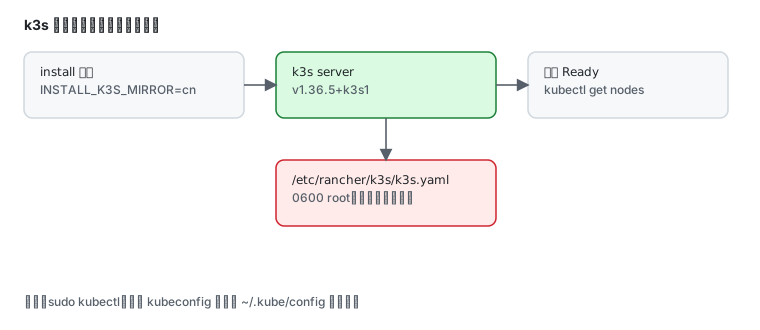
Installing k3s through the domestic mirror
Section titled “Installing k3s through the domestic mirror”k3s publishes a China mirror for both the script and the binaries:
curl -sfL https://rancher-mirror.rancher.cn/k3s/k3s-install.sh -o k3s-install.shls -l k3s-install.sh38251Run it with the mirror flag:
sudo INSTALL_K3S_MIRROR=cn sh k3s-install.shThe script reports each step:
[INFO] Creating uninstall script /usr/local/bin/k3s-uninstall.sh[INFO] env: Creating environment file /etc/systemd/system/k3s.service.env[INFO] systemd: Creating service file /etc/systemd/system/k3s.service[INFO] systemd: Enabling k3s unitCreated symlink '/etc/systemd/system/multi-user.target.wants/k3s.service' → '/etc/systemd/system/k3s.service'.[INFO] systemd: Starting k3sk3s brings its own systemd service, active immediately:
systemctl is-active k3sk3s --versionactivek3s version v1.36.5+k3s1 (3dd98cc5)The first kubectl call hits permission denied
Section titled “The first kubectl call hits permission denied”error: error loading config file "/etc/rancher/k3s/k3s.yaml": open /etc/rancher/k3s/k3s.yaml: permission deniedThe kubeconfig is root-only:
ls -l /etc/rancher/k3s/k3s.yaml-rw-------. root rootTwo ways out.
1. Use sudo (fastest)
sudo kubectl get nodesNAME STATUS ROLES AGE VERSIONfd45-repo Ready control-plane 76s v1.36.5+k3s12. Copy the kubeconfig into your home (for daily use)
mkdir -p ~/.kubesudo cp /etc/rancher/k3s/k3s.yaml ~/.kube/configsudo chown $USER ~/.kube/configkubectl get nodesWhat runs out of the box
Section titled “What runs out of the box”sudo kubectl get pods -ANAMESPACE NAME READY STATUS RESTARTS AGEkube-system coredns-7cfb7bc9c7-ckx4n 0/1 ContainerCreating 0 71skube-system helm-install-traefik-crd-b8hss 0/1 ContainerCreating 0 71skube-system helm-install-traefik-hwhd4 0/1 ContainerCreating 0 71sContainerCreating right after install is normal — k3s is orchestrating itself, pulling the system components (CoreDNS, Traefik ingress) into containerd.
A minute or two later they turn Running:
watch -n 5 sudo kubectl get pods -A| Component | Role |
|---|---|
coredns | in-cluster DNS |
traefik | default ingress controller |
local-path-provisioner | default StorageClass |
metrics-server | backs kubectl top |
k3s packs all of that into a single ~70 MB binary, which is why it fits a 4 GB single-node box while kubeadm does not.
Running a workload
Section titled “Running a workload”sudo kubectl create deployment hello --image=nginxsudo kubectl expose deployment hello --port=80 --type=NodePortsudo kubectl get svc helloNodePort allocates a port in 30000–32767, reachable at the node IP plus that port.
Uninstalling
Section titled “Uninstalling”k3s drops an uninstaller:
sudo /usr/local/bin/k3s-uninstall.shIt stops the service, removes the unit, and clears /var/lib/rancher/k3s and the container data. Make sure no workload needs preserving first.
Why not kind
Section titled “Why not kind”kind needs Docker or Podman to host its “node containers”, which is one extra layer on Fedora. For single-node experiments k3s is simpler:
| Option | Dependency | Fits |
|---|---|---|
| k3s (this page) | none, ships containerd | single-node labs, edge, light production |
| kind | Docker/Podman | CI clusters, multi-node topology tests |
| minikube | a driver (podman/docker/kvm) | full Kubernetes feature validation |
Common traps
Section titled “Common traps”| Symptom | Cause |
|---|---|
kubectl cannot read the kubeconfig | file is 0600 root; use sudo or copy to ~/.kube/config |
pods stuck in ContainerCreating | still pulling images; wait a minute or two |
| image pulls slow or failing | containerd has no registry mirror; see domestic mirrors |
| memory pressure after install | leave at least 2 GB free, 4 GB is comfortable |
| k3s restart-loops | journalctl -u k3s -n 50, usually port 6443 taken |
Related pages
Section titled “Related pages”- Podman in practice — container basics
- Containerfile and builds — building your own images
- Domestic mirrors — mirrors and registry acceleration
- firewalld — opening NodePort ranges
- Official: k3s documentation