
nginx plus PHP-FPM on Fedora: from the default page to a working PHP 8.5 request
Two packages are all you need for a web server on Fedora, and both are small:
sudo dnf install nginx php-fpmnginx version: nginx/1.30.5PHP 8.5.12 (fpm-fcgi) (built: Oct 19 2026 17:02:46) (NTS gcc x86_64)The nginx package itself is only 126.5 KiB; php-fpm comes as part of PHP.
Starting the services
Section titled “Starting the services”sudo systemctl enable --now nginx php-fpmsystemctl is-active nginx php-fpmactiveactivenginx listens on 80 by default:
ss -lntp | grep :80LISTEN 0 511 0.0.0.0:80 0.0.0.0:*LISTEN 0 511 [::]:80 [::]:*Fetch it:
curl -s http://127.0.0.1/ | grep -oE "Fedora|nginx" | head -2FedoraThat is Fedora’s welcome page; the document root is /usr/share/nginx/html.
Where the PHP-FPM socket lives
Section titled “Where the PHP-FPM socket lives”php-fpm does not use TCP by default; it uses a Unix socket:
ss -lx | grep php/run/php-fpm/www.sockThe pool config is /etc/php-fpm.d/www.conf:
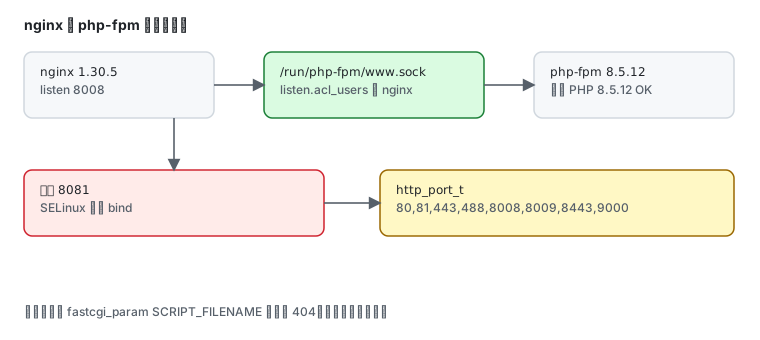
user = apachegroup = apachelisten = /run/php-fpm/www.socklisten.acl_users = apache,nginxlisten.acl_users already includes nginx — packaging deliberately grants the nginx process read/write on that socket, so you do not need to change ownership.
Handing PHP to php-fpm
Section titled “Handing PHP to php-fpm”Drop a server block in /etc/nginx/conf.d/ (this is the exact config that worked):
server {    listen 8008;    server_name _;    root /usr/share/nginx/html;    index index.php index.html;
location ~ \.php$ { fastcgi_pass unix:/run/php-fpm/www.sock; include fastcgi_params; fastcgi_param SCRIPT_FILENAME $document_root$fastcgi_script_name; }}sudo nginx -tsudo systemctl reload nginxnginx: configuration file /etc/nginx/nginx.conf test is successfulWrite a test file:
printf '<?php echo "PHP " . PHP_VERSION . " OK\n"; ?>' | \ sudo tee /usr/share/nginx/html/demo.php >/dev/nullRequest it:
curl -s http://127.0.0.1:8008/demo.phpPHP 8.5.12 OKThat is the whole chain working: nginx → Unix socket → php-fpm 8.5.12.
The trap: SELinux blocks non-standard ports
Section titled “The trap: SELinux blocks non-standard ports”I first ran this server on 8081 — nginx -t passed, reload succeeded, and the page simply refused to load. The error log said:
[emerg] bind() to 0.0.0.0:8081 failed (13: Permission denied)This is not file permissions but SELinux: nginx may only bind ports labelled http_port_t:
sudo semanage port -l | grep '^http_port_t'http_port_t tcp 80, 81, 443, 488, 8008, 8009, 8443, 9000http_port_t udp 80, 4438081 is not in the list; 8008 is. So either move to an allowed port (changing to 8008 worked immediately) or add the label:
sudo semanage port -a -t http_port_t -p tcp 8081Serving a static site
Section titled “Serving a static site”The default root is /usr/share/nginx/html; drop files there:
sudo cp -r mysite/* /usr/share/nginx/html/If the site lives elsewhere (say /srv/www), two things must change together:
# 1. SELinux labelsudo semanage fcontext -a -t httpd_sys_content_t "/srv/www(/.*)?"sudo restorecon -Rv /srv/www
# 2. root in the nginx config
Change root without the label and nginx returns 403 Forbidden — the file exists and is readable, but the SELinux context is wrong. See SELinux.
Exposing it
Section titled “Exposing it”The firewall opens only three services by default:
sudo firewall-cmd --list-servicesdhcpv6-client mdns sshAllow HTTP:
sudo firewall-cmd --add-service=http --permanentsudo firewall-cmd --reloadHTTPS is the same with --add-service=https. Details in firewalld.
Everyday operations
Section titled “Everyday operations”sudo nginx -t # test config before reloadingsudo systemctl reload nginx # graceful reload, no dropped connectionssudo systemctl restart php-fpm # needed after php.ini or pool changestail -f /var/log/nginx/error.log # first place to looktail -f /var/log/php-fpm/www-error.logThe difference matters: reload keeps existing connections, so nginx config changes only need reload; php-fpm pool changes in www.conf need a restart.
Common traps
Section titled “Common traps”| Symptom | Cause |
|---|---|
bind() ... (13: Permission denied) | SELinux forbids the port; use an http_port_t port or semanage port -a |
| PHP page returns 404 | missing fastcgi_param SCRIPT_FILENAME |
| static file returns 403 | wrong SELinux context, not httpd_sys_content_t |
| 502 Bad Gateway | php-fpm down, or the socket path is wrong |
| config change has no effect | forgot systemctl reload nginx |
| unreachable from outside | firewall does not allow http |
| mangled non-ASCII paths | check charset utf-8; and filesystem encoding |
Related pages
Section titled “Related pages”- Install PHP — PHP 8.5, extensions, and the default php-fpm state
- SELinux — port labels and file contexts
- firewalld — allowing 80/443
- Podman in practice — multi-version PHP sites in containers
- Official: nginx docs · PHP-FPM docs