
Running Windows software on Fedora 45: Wine 11.0 costs 592 MiB to install
Wine works on Fedora, but price it before you start.
What the repository has
Section titled “What the repository has”dnf list --available winewine.x86_64 11.0-3.fc44 fedoraNote the fc44 suffix: this package was built for Fedora 44 and shipped in the F45 repository. It works, but it is not a rebuild for this release.
dnf info wineVersion : 11.0Release : 3.fc44Summary : A compatibility layer for windows applicationsIt is not installed by default:
rpm -q winepackage wine is not installedWhat installing actually costs
Section titled “What installing actually costs”Measured transaction:
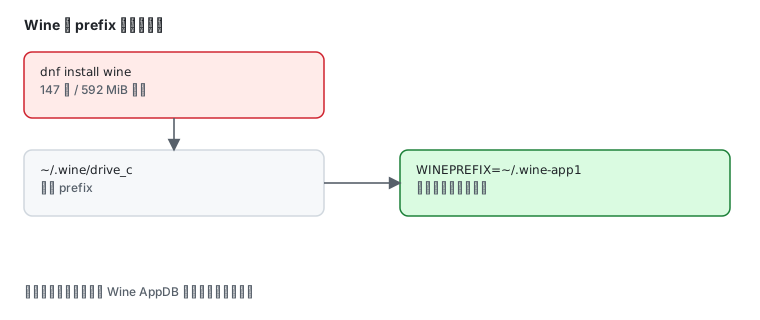
sudo dnf install --assumeno wineInstalling: 147 packagesTotal size of inbound packages is 592 MiB. Need to download 592 MiB.147 packages and 592 MiB of downloads. That is the first number to look at — Wine is not something to install casually.
Using it
Section titled “Using it”sudo dnf install winewine --versionThe first Windows program you launch creates a prefix (an emulated C: drive):
winecfgThe default location:
~/.wine/drive_c/winecfg opens the configuration UI for the Windows version, drive mapping, display and audio. It needs a graphical session — it cannot run on a headless server.
Isolate programs with separate prefixes
Section titled “Isolate programs with separate prefixes”Keep unrelated programs apart so they cannot pollute each other:
WINEPREFIX=~/.wine-app1 wine program.exeWINEPREFIX decides which isolated environment the program sees.
Everyday commands
Section titled “Everyday commands”| Command | Purpose |
|---|---|
wine program.exe | run a program |
winecfg | configuration UI |
wine uninstaller | uninstall installed programs |
wineserver -k | kill all Wine processes |
WINEPREFIX=... wine ... | use a specific prefix |
Judging compatibility
Section titled “Judging compatibility”Compatibility is per program; there is no blanket “Wine supports Windows software”. Check in this order:
- Look the program up in Wine’s AppDB and read its rating (Garbage / Bronze / Silver / Gold / Platinum)
- Below Silver usually means DLL overrides or registry tweaks
- When extra components are needed, install them with
winetricks(fonts, runtimes, .NET and so on)
When not to use Wine
Section titled “When not to use Wine”| Situation | Better option |
|---|---|
| a native Linux build exists | use the native build |
| ordinary Windows office software | a virtual machine (GNOME Boxes, virt-manager) |
| exact Windows behaviour required | a virtual machine, do not gamble on Wine |
| one small tool | check AppDB first, only proceed for Platinum or Gold |
Wine’s value is running Windows programs without Windows. Once you are repeatedly adjusting DLLs and the registry for one application, a virtual machine is cheaper in time.
Common traps
Section titled “Common traps”| Symptom | Cause |
|---|---|
winecfg will not open | no graphical session |
| program exits immediately with no output | missing runtime in the prefix; add it with winetricks |
| Chinese text shows as boxes | the prefix lacks CJK fonts |
| an upgrade broke an old program | the prefix was upgraded underneath it; use a separate WINEPREFIX |
| download much larger than expected | 147 packages and 592 MiB is normal |
Related pages
Section titled “Related pages”- Podman in practice — another way to run Windows software
- Editors — desktop tool selection
- Official: Wine AppDB