
Installing Ollama on Fedora: the package split, the local service, and measured model download speed
Unlike k3s, Ollama is packaged in the official Fedora repositories:
dnf list --available ollamaollama.x86_64 0.24.0-4.fc45 fedoraBut read the packaging before installing — Fedora splits one Ollama into four packages.
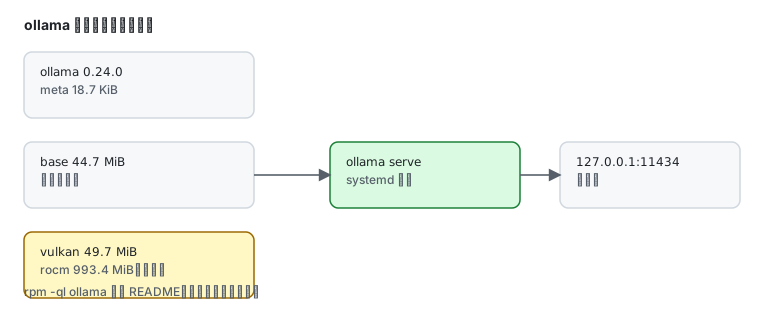
Four packages, and ollama itself is 18.7 KiB
Section titled “Four packages, and ollama itself is 18.7 KiB”rpm -qR ollama | grep -v rpmlib/bin/shollama-base(x86-64) = 0.24.0-4.fc45ollama-rocm(x86-64) = 0.24.0-4.fc45ollama-vulkan(x86-64) = 0.24.0-4.fc45ollama is a meta package: dnf install ollama drags in all three backends. Measured sizes:
| Package | Installed size | Contents |
|---|---|---|
ollama | 18.7 KiB | README and dependency declarations only |
ollama-base | 44.7 MiB | main binary plus CPU backend |
ollama-vulkan | 49.7 MiB | Vulkan backend (generic GPU) |
ollama-rocm | 993.4 MiB | AMD ROCm backend |
What the meta package actually installs:
rpm -ql ollama/usr/share/doc/ollama/usr/share/doc/ollama/README.mdNot a single binary — the real ollama executable lives in ollama-base.
CPU-only: install ollama-base
Section titled “CPU-only: install ollama-base”On a server without a GPU (like this lab box):
sudo dnf install ollama-baseThat skips 993 MiB of rocm and 49.7 MiB of vulkan, keeping only the 44.7 MiB CPU backend.
Machines with an NVIDIA card cannot take this route — there is no cuda backend subpackage, so use the upstream install script that ships CUDA.
Starting the service
Section titled “Starting the service”sudo systemctl enable --now ollamasystemctl is-active ollamaollama --versionactiveollama version is 0.24.0By default the service binds to loopback:
ss -lntp | grep 11434LISTEN 0 4096 127.0.0.1:11434 0.0.0.0:*127.0.0.1 means local access only. To serve other machines on the LAN, change OLLAMA_HOST:
sudo systemctl edit ollama[Service]Environment="OLLAMA_HOST=0.0.0.0:11434"Then sudo systemctl daemon-reload && sudo systemctl restart ollama.
Pulling models: the real bottleneck
Section titled “Pulling models: the real bottleneck”Installing the package takes seconds; pulling models is what hurts. Measured with a 91 MB model:
ollama pull smollm:135mpulling eb2c714d40d4: 13% ▕██ ▏ 12 MB/ 91 MB 154 KB/s 8m33spulling eb2c714d40d4: 33% ▕█████ ▏ 30 MB/ 91 MB 63 KB/s 16m2spulling eb2c714d40d4: 46% ▕█████████ ▏ 46 MB/ 91 MB 91 KB/s 8m16sThroughput oscillates between 63 and 154 KB/s, so 91 MB takes fifteen to twenty minutes. A 4 GB 7B model at that rate is hours.
So the real problem in this region is not installing the software, it is getting model files in.
| Approach | Note |
|---|---|
| use smaller models | 135m / 0.5B class, tens to hundreds of MB, tolerable |
| pull elsewhere, copy over | after ollama pull, copy the model directory to the target host |
| domestic model platforms | ModelScope hosts official model repos, but you must convert to Ollama format — not a one-liner |
Everyday commands
Section titled “Everyday commands”ollama list # models present locallyollama pull qwen2.5:0.5b # fetch a modelollama run qwen2.5:0.5b # interactive chatollama ps # models currently loaded in memoryollama rm smollm:135m # delete a modelollama run opens a REPL; leave with /bye. For one-shot use:
ollama run qwen2.5:0.5b "explain SELinux in one sentence"Measured CPU inference
Section titled “Measured CPU inference”Once a model is local, --verbose prints the real per-stage timings:
ollama run smollm:135m --verbose "Say hello in five words."load duration: 31.149937msprompt eval count: 15 token(s)prompt eval duration: 12.673781msprompt eval rate: 1183.55 tokens/seval count: 586 token(s)eval duration: 3.921963228seval rate: 149.41 tokens/s| Stage | Meaning | Measured |
|---|---|---|
load duration | model read from disk into memory | 31.15 ms |
prompt eval | processing the prompt | 1183.55 tokens/s |
eval | generating tokens | 149.41 tokens/s |
Those are numbers for a 135M model on CPU alone. Generation speed drops roughly with parameter count, so small models are usable on CPU while a 7B typically manages single-digit tokens per second.
Memory and concurrency
Section titled “Memory and concurrency”On CPU inference the model is loaded into memory whole. With 3 GB of RAM a 0.5B model is fine; a 7B (about 4.7 GB) will OOM.
free -g | head -2ollama psollama ps shows the memory each loaded model occupies. When it does not fit, the OOM killer takes the process — visible in journalctl -u ollama -n 50.
Common traps
Section titled “Common traps”| Symptom | Cause |
|---|---|
ollama command missing | only the meta package installed? check rpm -q ollama-base |
| disk shrank by ~1 GB | ollama-rocm came along; without an AMD GPU install ollama-base |
| cannot reach 11434 remotely | default bind is 127.0.0.1; set OLLAMA_HOST |
| model pulls crawl | files come from ollama.com with no regional acceleration |
| machine freezes on a large model | not enough RAM; the model loads whole |
ollama --version prints only a warning | the service is down; systemctl start ollama |
Related pages
Section titled “Related pages”- Podman in practice — running Ollama in a container instead
- Multi-version installs — several runtimes side by side
- Domestic mirrors — package repos and mirrors
- Official: Ollama documentation