
在 Fedora 上装 PyTorch:仓库版 2 GiB 依赖 vs pip CPU 轮子 209 MB
Fedora 装 PyTorch 有两条路,实测代价差一个数量级。
路线一:Fedora 仓库(不推荐)
Section titled “路线一:Fedora 仓库(不推荐)”dnf list --available python3-torchpython3-torch.x86_64 2.12.0-7.fc45 fedora看着只有 399 MiB 下载、755 MiB 安装,但真跑起来是这样:
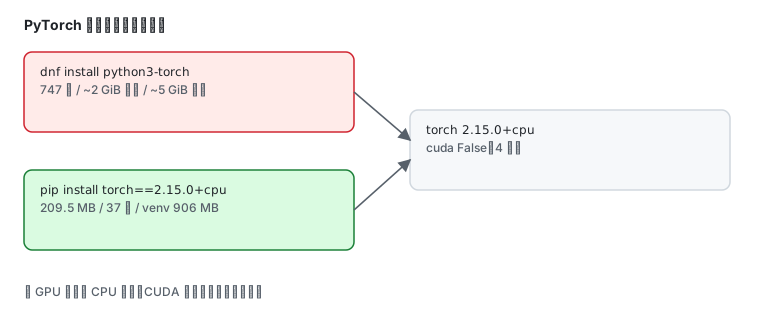
Total size of inbound packages is 2 GiB. Need to download 2 GiB.After this operation, 5 GiB extra will be used (install 5 GiB, remove 3 MiB).[ 1/747] cpuinfo-0:25.11.14-1.gitf858c 100% | 14.9 KiB/s | 44.7 KiB | 00m03s747 个包、2 GiB 下载、5 GiB 磁盘。在本站实验机上实测下载缓存增速约 43 KB/s,按这个速度剩下的部分要十几个小时,只能中止。
| 项目 | 数值 |
|---|---|
| 下载总量 | 2 GiB |
| 依赖包数 | 747 |
| 磁盘占用 | 5 GiB |
| 本机实测速度 | ~43 KB/s |
路线二:pip CPU 轮子(推荐)
Section titled “路线二:pip CPU 轮子(推荐)”先确认 pip 在不在——Fedora 默认不装 pip:
python3 -m pip --version/usr/bin/python3: No module named pip装一个,再建虚拟环境:
sudo dnf install python3-pippython3 -m venv ~/torch-venvpython3-pip 实测版本 26.1.2-5.fc45。
然后拉 CPU 专用轮子:
~/torch-venv/bin/pip install --no-deps \ --index-url https://download.pytorch.org/whl/cpu \ "torch==2.15.0+cpu"Downloading torch-2.15.0%2Bcpu-cp315-cp315-manylinux_2_28_x86_64.whl (209.5 MB) ━━━━━━━━━━━━━━━━━━━━━━━━━━━━━━━━━━━━━━━━ 209.5/209.5 MB 5.9 MB/s 0:00:37209.5 MB,5.9 MB/s,37 秒。对比 dnf 那条路的 2 GiB / 43 KB/s,差距是两个数量级。
torch 导入实际只需要这几个小包:
~/torch-venv/bin/pip install \ --index-url https://pypi.tuna.tsinghua.edu.cn/simple \ typing_extensions filelock jinja2 fsspec装完就能 import torch —— 不需要 sympy 和 networkx。
NumPy 是可选的,但不装会有警告:
UserWarning: Failed to initialize NumPy: No module named 'numpy'想让 .numpy() 正常工作就补上:
~/torch-venv/bin/pip install numpyimport torch, timeprint("version:", torch.__version__)print("cuda available:", torch.cuda.is_available())print("threads:", torch.get_num_threads())a = torch.randn(512, 512); b = torch.randn(512, 512)t0 = time.time(); c = a @ b; dt = (time.time() - t0) * 1000print("matmul 512x512: %.2f ms" % dt)print("shape:", tuple(c.shape))print("mean:", float(torch.tensor([1.0, 2.0, 3.0]).mean()))实测输出:
version: 2.15.0+cpucuda available: Falsethreads: 4matmul 512x512: 2.11 msshape: (512, 512)mean: 2.0几件事一眼可见:
- 版本带
+cpu后缀,说明是纯 CPU 构建 cuda available: False——没有 GPU 时的正常结果,不是装错了threads: 4是 CPU 并行度,由核心数决定- 512×512 矩阵乘 2.11 ms
装上 numpy 之后张量互转也通了:
~/torch-venv/bin/python -c "import torch;print(torch.tensor([1.0,2.0]).numpy())"[1. 2.]装完占多少磁盘
Section titled “装完占多少磁盘”du -sm ~/torch-venv906整个 venv 906 MB(轮子 209.5 MB 解压后膨胀到约 900 MB),比 dnf 那条路的 5 GiB 省得多。
两条路怎么选
Section titled “两条路怎么选”Fedora 仓库 python3-torch | pip CPU 轮子 | |
|---|---|---|
| 下载 | 2 GiB / 747 包 | 209.5 MB / 37 秒 |
| 磁盘 | 5 GiB | 906 MB(venv) |
| 版本 | 2.12.0 | 2.15.0+cpu |
| 隔离 | 装进系统 Python | venv 隔离,删目录即卸载 |
| 适合 | 需要系统级统一管理 | 绝大多数场景 |
| 现象 | 原因 |
|---|---|
No module named pip | Fedora 默认不装 pip,dnf install python3-pip |
依赖下载卡在 sympy | 主索引指向 pytorch.org,小包极慢;依赖改走国内源 |
Failed to initialize NumPy 警告 | 没装 numpy,.numpy() 不可用 |
cuda available: False | 装的是 CPU 轮子且无 GPU,不是错误 |
| 磁盘突然少 5 GiB | 走了 dnf 路线 |
| 需要 GPU 版 | 换成 --index-url https://download.pytorch.org/whl/cu126 之类的 CUDA 索引 |
- 安装 Python — 解释器与 venv 基础
- Ollama 本地模型 — 另一条本地 AI 路线
- 国内加速源 — 软件源与镜像站
- 官方:PyTorch 安装页