
Fedora 上的 SELinux:模式、上下文、布尔值与排障
Fedora 是把 SELinux 默认开到 enforcing 的发行版。它不是”额外的安全插件”,而是在权限位之外再加一层:即使你是 root,策略不允许的动作也会被拒绝。
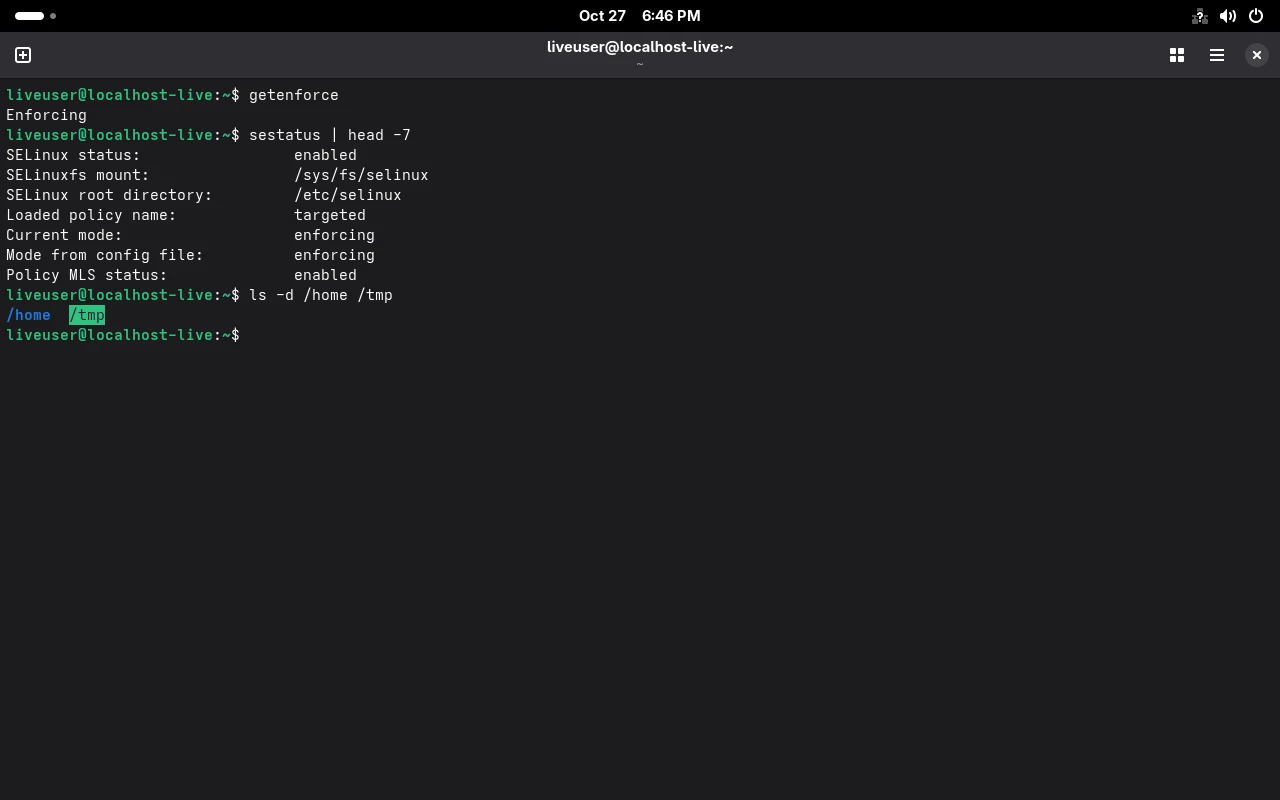
下面是 F45 上的实测状态。
当前是什么状态
Section titled “当前是什么状态”getenforcesestatusEnforcing
SELinux status: enabledSELinuxfs mount: /sys/fs/selinuxSELinux root directory: /etc/selinuxLoaded policy name: targetedCurrent mode: enforcingMode from config file: enforcingPolicy MLS status: enabledPolicy deny_unknown status: allowedMemory protection checking: actual (secure)Max kernel policy version: 35三个字段值得记住:
| 字段 | 含义 | 什么时候看 |
|---|---|---|
Loaded policy name | targeted,只对特定进程加约束 | 判断是不是”全量策略” |
Current mode | 运行时模式 | 排障时第一眼看这个 |
Mode from config file | 配置里的模式 | 与前一项不一致说明有人临时切过 |
模式:三个值,不是两个
Section titled “模式:三个值,不是两个”cat /etc/selinux/config | grep -E "^SELINUX="SELINUX=enforcing- enforcing:策略照常执行,越界即拒绝;
- permissive:只记录不拦截,用于确认”是不是 SELinux 干的”;
- disabled:完全不加载策略,需要重启且重建文件标签,代价最大。
sudo setenforce 0 # 临时切 permissive,重启失效getenforce # Permissivesudo setenforce 1 # 切回文件上下文:多出来的一段标签
Section titled “文件上下文:多出来的一段标签”ls -Zd /home /root /tmp /usr/bin/passwd system_u:object_r:home_root_t:s0 /home system_u:object_r:admin_home_t:s0 /root system_u:object_r:tmp_t:s0 /tmpsystem_u:object_r:passwd_exec_t:s0 /usr/bin/passwduser:role:type:level 四段里,实际起作用的是第三段 type。
最常见的坑:把文件搬到新位置,type 没跟着变,服务就起不来。
sudo restorecon -Rv /var/www # 按策略恢复默认标签sudo chcon -t httpd_sys_content_t /srv/site/index.html # 临时指定(不持久)sudo semanage fcontext -a -t httpd_sys_content_t '/srv/site(/.*)?' # 持久规则sudo restorecon -Rv /srv/site端口与布尔值:不需要写策略就能放行
Section titled “端口与布尔值:不需要写策略就能放行”端口——服务要监听非标准端口时,先看策略允许哪些:
sudo semanage port -l | grep -E "^http_port_t|^ssh_port_t"http_port_t tcp 80, 81, 443, 488, 8008, 8009, 8443, 9000要让 httpd 监听 8080,得先把端口加进去:
sudo semanage port -a -t http_port_t -p tcp 8080布尔值——策略内置的开关,比写自定义策略便宜得多:
sudo semanage boolean -l | grep httpd_can_network_connecthttpd_can_network_connect (off , off) Allow httpd to can network connect括号里两个值是「当前 / 开机默认」。打开并持久化:
sudo setsebool -P httpd_can_network_connect ongetsebool httpd_can_network_connecthttpd_can_network_connect --> on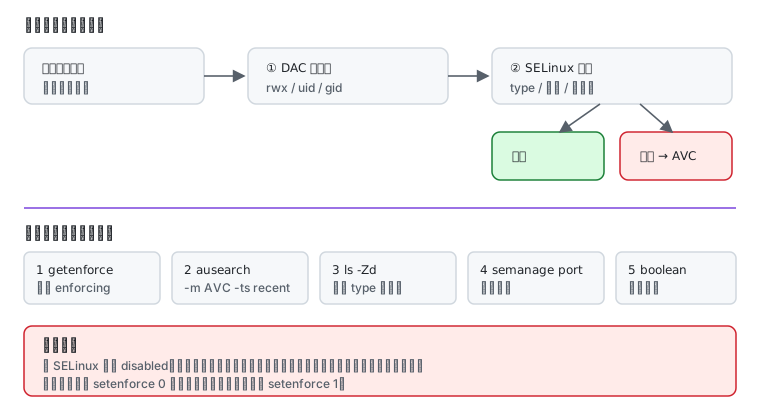
getenforce # 1) 现在是不是 enforcingsudo ausearch -m AVC -ts recent # 2) 有没有拒绝记录ls -Zd <相关路径> # 3) 标签对不对sudo semanage port -l | grep <端口> # 4) 端口类型sudo semanage boolean -l | grep <关键词> # 5) 有没有现成开关ausearch 没有输出(<no matches>)有两种含义:真的没被拒,或者 auditd 没跑。先确认后者:
systemctl status auditd --no-pager什么时候不该关它
Section titled “什么时候不该关它”关掉 SELinux 能立刻让问题消失,但你同时失去:
- 容器与宿主机之间的强制隔离(容器页里反复提到这点);
- 服务被攻破后的横向限制;
- 出问题时唯一的线索来源。
正确顺序是:先切 permissive 确认是不是它,再按上面的五步修,最后切回 enforcing。把 disabled 当默认解法,等于把一个问题换成三个。
- 用户与权限 — wheel 与 sudo
- SSH 与密钥 — 远程登录
- Fedora 容器与 rootless — SELinux 与容器卷的关系
- 报错速查 —
chcon: failed to change context、ausearch: <no matches> - 存储与文件系统 — btrfs 子卷与挂载
- 命令速查 — SELinux 相关命令
- 官方:Changing SELinux states and modes